WPF 4: Changing DataGrid Cell Appearance on Mouse Events
Posted by: Mahesh Sabnis ,
on 10/28/2011,
in
Category WPF
Abstract: This article shows how to use property triggers in WPF to apply styles to the DataGrid at runtime.
I was having a discussion with one of my clients about changing the appearance of the WPF DataGrid Cell, when a certain condition is met. His requirement was that a WPF application contains a DataGrid which displays Sales data. When a user wants to focus on a specific Quarter sales for a specific product, then the Cell containing the Sales data should be highlighted. Now this is a typical requirement where you can easily apply effects on the DataGrid cell using Property Triggers. In WPF, we can target Styles to a specific UI element using which the UI can be dynamically manipulated.
Let us get started.
Step 1: Open VS2010 and create a WPF application. Add the following XAML code in MainWindow.xaml:
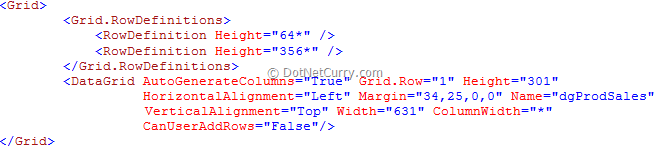
Step 2: In the code-behind (MainWindow.xaml.cs) add the following code:

The above code defines a ProductSales class and its collection. Bind this collection with the DataGrid in the Windows Loaded event as below:

Step 3: Open MainWindow.xaml and add the following style in the Windows Resources section.
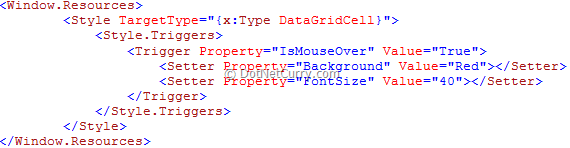
The above XAML code contains a Style targeted to the DatGridCell. The property for applying the Style is defined as ‘IsMouseOver’. If you observe, the Style does not have any key (x:key) set for it. This means that the style defined can now be applied on every DataCell of the DataGrid.
Step 4: Run the application and hover the mouse over the DataGrid Cell. The result will be as shown below:

The entire source code of this article can be downloaded over here
This article has been editorially reviewed by Suprotim Agarwal.
C# and .NET have been around for a very long time, but their constant growth means there’s always more to learn.
We at DotNetCurry are very excited to announce The Absolutely Awesome Book on C# and .NET. This is a 500 pages concise technical eBook available in PDF, ePub (iPad), and Mobi (Kindle).
Organized around concepts, this Book aims to provide a concise, yet solid foundation in C# and .NET, covering C# 6.0, C# 7.0 and .NET Core, with chapters on the latest .NET Core 3.0, .NET Standard and C# 8.0 (final release) too. Use these concepts to deepen your existing knowledge of C# and .NET, to have a solid grasp of the latest in C# and .NET OR to crack your next .NET Interview.
Click here to Explore the Table of Contents or Download Sample Chapters!
Was this article worth reading? Share it with fellow developers too. Thanks!
Mahesh Sabnis is a DotNetCurry author and a Microsoft MVP having over two decades of experience in IT education and development. He is a Microsoft Certified Trainer (MCT) since 2005 and has conducted various Corporate Training programs for .NET Technologies (all versions), and Front-end technologies like Angular and React. Follow him on twitter @
maheshdotnet or connect with him on
LinkedIn