Silverlight 4.0: Applying Data Templates on ListBox at Runtime
Posted by: Mahesh Sabnis ,
on 7/21/2011,
in
Category Silverlight 2, 3, 4 and 5
Abstract: DataTemplates in Silverlight are typically used for visual representation of your data. They are particularly useful when you are binding an ItemsControl such as a ListBox to a collection. I was recently asked to make use of a DataTemplate on a ListBox at runtime, for performing Update operations. In this article, I have demonstrated how to declare DataTemplates in XAML and to read and apply them at runtime
DataTemplates in Silverlight are typically used for visual representation of your data. They are particularly useful when you are binding an ItemsControl such as a ListBox to a collection. I was recently asked to make use of a DataTemplate on a ListBox at runtime, for performing Update operations. In this article, I have demonstrated how to declare DataTemplates in XAML and to read and apply them at runtime.
Note: If you are interested in Silverlight development, make sure you check out this article - Microsoft Silverlight 4 Tutorials You Must Read
Step 1: Open VS2010 and create a new Silverlight application, name it as ‘SL4_Records_ListBox’. In the project, add a new class file and add the following classes in it:

The Employee class acts as an entity for Update Operation parameter. The EmployeeCollection class defines methods for reading all Employees and performing Update operations on the EmployeeCollection.
Step 2: Open MainPage.Xaml and define the following DataGrid and a ListBox. Define DataGrid columns bound with properties from the Employee class.
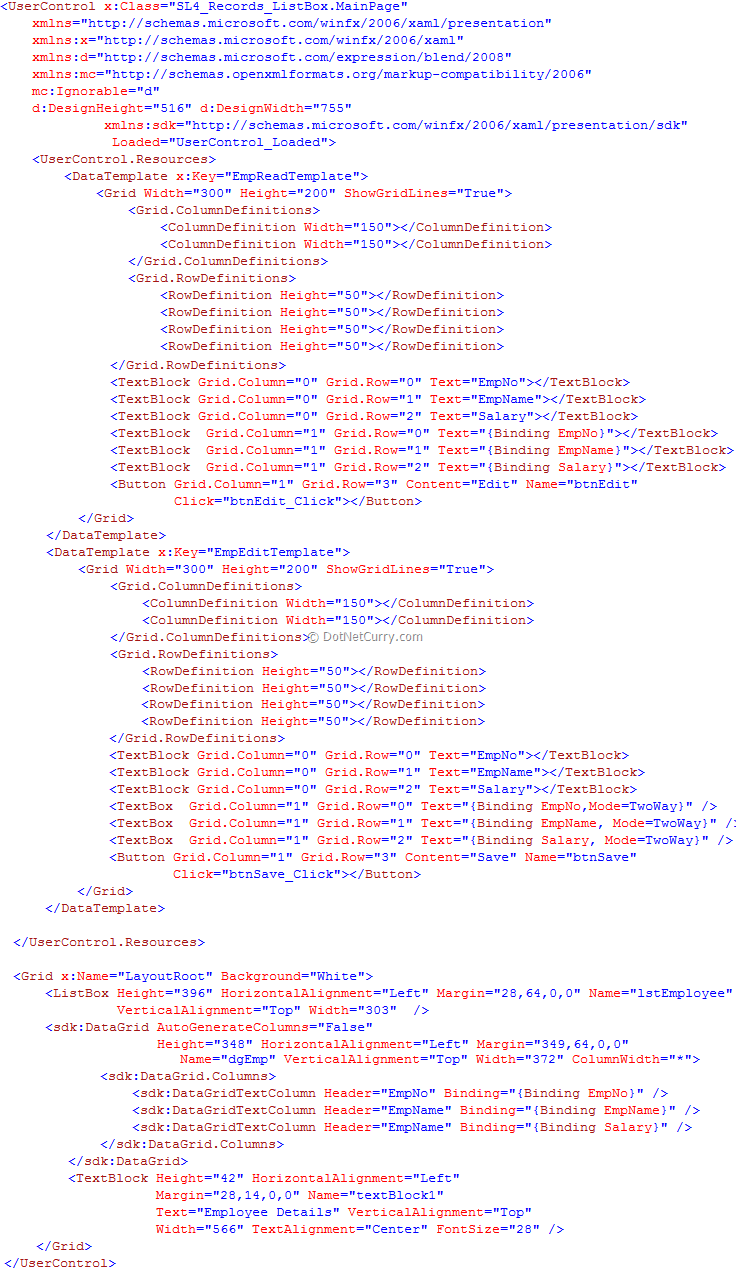
The above XAML defines two DataTemplates ‘EmpReadTemplate’ and ‘EmpEditTemplate’. The ‘EmpReadTemplate’ defines XAML elements to display read-only Employee record in each ListBoxItem of the List ‘lstEmployee’, using TextBlocks. It also defines an ‘Edit’ button which is used for changing the DataTemplate. The ‘EmpEditTemplate’ is used to display editable ListBoxItem for the ListBox. This DataTemplate also has a Button element which is used to update the changed value for the Employee in the EmployeeCollection.
Step 3: Open MainPage.Xaml.cs and write the following code.

Please read the comments marked on each method to understand the flow. These comments explain the role of each method in the application.
Step 4: Run the application. The result will be as shown below:
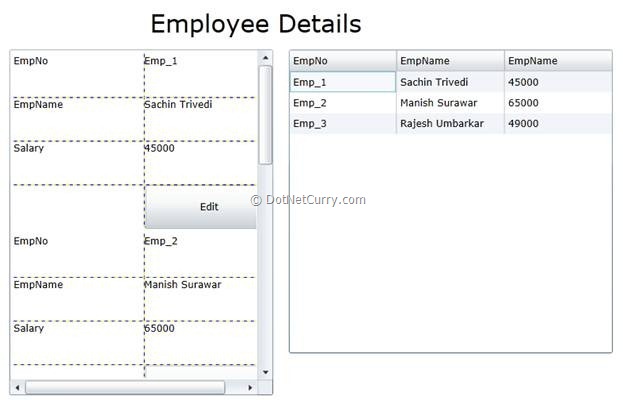
The above code shows that the ‘EmpReadTemplate’ is displayed for each ListBoxItem for the ListBox. Now click on the Edit button and the result will be as shown below:
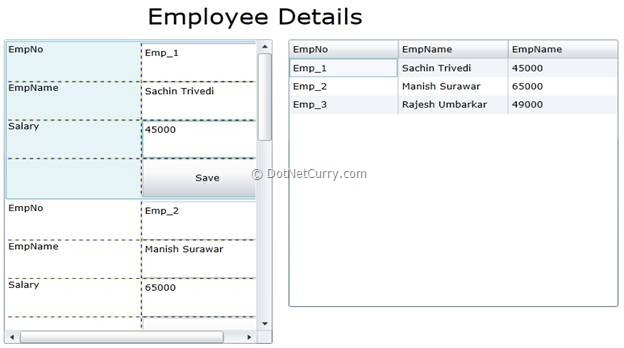
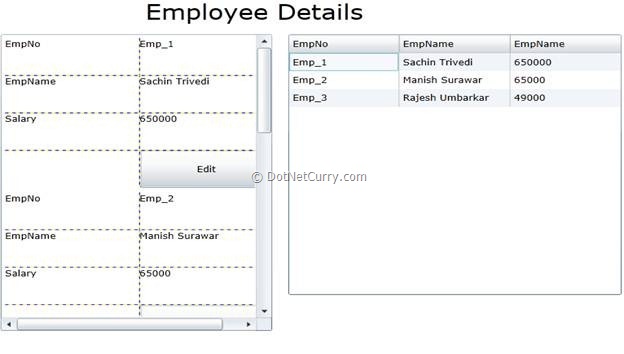
The ‘EmpReadTemplate’ is replaced by ‘EmpEditTemplate’. Now change the Salary and click on ‘Save’ button and the result will similar to the following:
Conclusion: This technique of changing DataTemplate at runtime for ItemsControls comes very handy while developing UI as per our business applications.
The entire source code of this article can be downloaded over here.
This article has been editorially reviewed by Suprotim Agarwal.
C# and .NET have been around for a very long time, but their constant growth means there’s always more to learn.
We at DotNetCurry are very excited to announce The Absolutely Awesome Book on C# and .NET. This is a 500 pages concise technical eBook available in PDF, ePub (iPad), and Mobi (Kindle).
Organized around concepts, this Book aims to provide a concise, yet solid foundation in C# and .NET, covering C# 6.0, C# 7.0 and .NET Core, with chapters on the latest .NET Core 3.0, .NET Standard and C# 8.0 (final release) too. Use these concepts to deepen your existing knowledge of C# and .NET, to have a solid grasp of the latest in C# and .NET OR to crack your next .NET Interview.
Click here to Explore the Table of Contents or Download Sample Chapters!
Was this article worth reading? Share it with fellow developers too. Thanks!
Mahesh Sabnis is a DotNetCurry author and a Microsoft MVP having over two decades of experience in IT education and development. He is a Microsoft Certified Trainer (MCT) since 2005 and has conducted various Corporate Training programs for .NET Technologies (all versions), and Front-end technologies like Angular and React. Follow him on twitter @
maheshdotnet or connect with him on
LinkedIn