ASP.NET: Loop Statements in WebMatrix and Razor
Posted by: Suprotim Agarwal ,
on 7/25/2011,
in
Category ASP.NET
Abstract: Microsoft WebMatrix utilizes the new Razor syntax. All programming languages use the Loop constructs and the same goes for WebMatrix programming too. If you are new to the razor syntax, it could be confusing at times to remember programming constructs in Razor. This article aims at giving you a basic loop programming concept overview if you are using WebMatrix.
If you have been visiting this site regularly, you must be familiar with the free Microsoft WebMatrix tool which is a lightweight web development platform and helps you to create websites in different ways. This tool is primarily aimed at new developers as well as PHP/Ruby developers who are starting with web development using ASP.NET. However this article is also useful for devs using ASP.NET MVC and getting started with the Razor view engine.
Microsoft WebMatrix utilizes the new Razor syntax and everything in Razor begins with the @ symbol. For those who have programmed in ASP.NET earlier, the @ symbol is also a replacement for the <%…%> syntax. Now all programming languages use the Loop constructs and the same goes for WebMatrix programming too. If you are new to the razor syntax, it could be confusing at times to remember programming constructs in Razor. This article aims at giving you a basic loop programming concept overview if you are using WebMatrix. This article assumes you have used loops in other programming languages. So roll up your sleeves and let us get started:
Note: Just make sure that you have read the article ASP.NET WebMatrix - Getting Started if you are new to WebMatrix and Razor.
For Loop Razor Syntax
If you know exactly how many times you want to loop, you use a ‘for’ loop. The for loop syntax is Razor is very simple and requires less typing when compared to the asp.net server side syntax. In razor, you would use a for loop as follows:

whereas in ASP.NET server-side syntax, the same would be written as
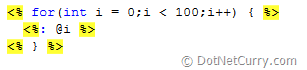
As you can observe, the razor syntax is much simpler. The first statement (var i=0;) creates a counter and initializes it to 0. When the for loop runs, the counter is automatically incremented. The second statement (i < 100) sets the condition for how far you want to run the loop. In our case, we want to go till 99. The third statement (i++ ) uses an increment operator, which adds one to the counter each time the loop runs.
The @i renders the variable number and prints it’s value. You can even use expressions here like (@i * 10) which multiplies the value of ‘i’ with 10.
Foreach Loop Razor syntax
The Foreach loop is used to loop through a collection of objects. Here’s an example of how to loop through the values in Request.Querystring using Foreach loop. The Request.QueryString gives collection of information about the querystring params in the current request.

The foreach keyword is followed by parentheses where you declare a variable ‘str’ that represents a single item in the collection. It is followed by the ‘in’ keyword, followed by the collection you want to loop through – in our case the collection is Request.QueryString. In the body of the foreach loop, we are accessing the current item using the variable that you declared earlier i.e. @str.
However what if you want the code inside the foreach to be treated as content i.e. you want to avoid using an HTML element inside the code container block to print some text? Just use the @: character sequence to explicitly indicate that this line within our code block should be treated as content.

While Loop Razor Syntax
The while loop is similar to the for loop with the difference being that it executes code as long as a condition is true, in our case, as long as cnt < 50 as shown below:

Switch-case statement Razor syntax
On a side note, if you are wondering how a switch-case statement is written is Razor, here’s the code. The switch-case statement is not a loop but is used when you have to test a large number of conditions. In this example however, we will test only a few conditions for understanding purposes.

Well those were some basics needed to use Loops in Razor within ASP.NET Web Pages. We will see more of Razor in the forthcoming articles. Stay tuned!
This article has been editorially reviewed by Suprotim Agarwal.
C# and .NET have been around for a very long time, but their constant growth means there’s always more to learn.
We at DotNetCurry are very excited to announce The Absolutely Awesome Book on C# and .NET. This is a 500 pages concise technical eBook available in PDF, ePub (iPad), and Mobi (Kindle).
Organized around concepts, this Book aims to provide a concise, yet solid foundation in C# and .NET, covering C# 6.0, C# 7.0 and .NET Core, with chapters on the latest .NET Core 3.0, .NET Standard and C# 8.0 (final release) too. Use these concepts to deepen your existing knowledge of C# and .NET, to have a solid grasp of the latest in C# and .NET OR to crack your next .NET Interview.
Click here to Explore the Table of Contents or Download Sample Chapters!
Was this article worth reading? Share it with fellow developers too. Thanks!
Suprotim Agarwal, MCSD, MCAD, MCDBA, MCSE, is the founder of
DotNetCurry,
DNC Magazine for Developers,
SQLServerCurry and
DevCurry. He has also authored a couple of books
51 Recipes using jQuery with ASP.NET Controls and
The Absolutely Awesome jQuery CookBook.
Suprotim received the prestigious Microsoft MVP award for 17 consecutive years, until he resigned from the program in 2025. In a professional capacity, he is the CEO of A2Z Knowledge Visuals Pvt Ltd, a digital group that offers Digital Marketing and Branding services to businesses, both in a start-up and enterprise environment.
Get in touch with him on Twitter @suprotimagarwal or at LinkedIn